Service Apartment Configurator
Back to top

3D apartment configurator buyers pick the flooring, finishes and furniture

Start a project

The buyer stands in the flat, picks the flooring, the kitchen finish and the furniture from the options you sell, and sees the result at once.

Service

A 3D apartment configurator is an interactive walkthrough built around choices. The buyer walks through the flat and picks flooring, finishes, furniture and lighting from the options you offer. The room changes as they choose.

It is for developers who sell homes with options: two or three finish packages, a choice of kitchen, furnished and unfurnished versions, or more than one layout of the same flat. A brochure shows each option on a separate page, and the buyer has to imagine them together. A configurator shows the combination they picked, in the room, from where they are standing. We build it in Unreal Engine as a specialist form of our interactive walkthrough.

What you get

  • 01

    Flooring and wall finishes

    Marble, tile or timber floors, and paint or panelling on the walls, switched one at a time or as a package.

  • 02

    Kitchens and bathrooms

    Cabinet colours, counter materials, tiles and fittings, shown in the real kitchen and bathroom layouts.

  • 03

    Furniture layouts

    Furnished, unfurnished, or two furniture styles, so the buyer can judge the size of each room.

  • 04

    Light and time of day

    Day and evening lighting, with the lamps on or off, so each finish is seen in both.

  • 05

    Interactive floor plan

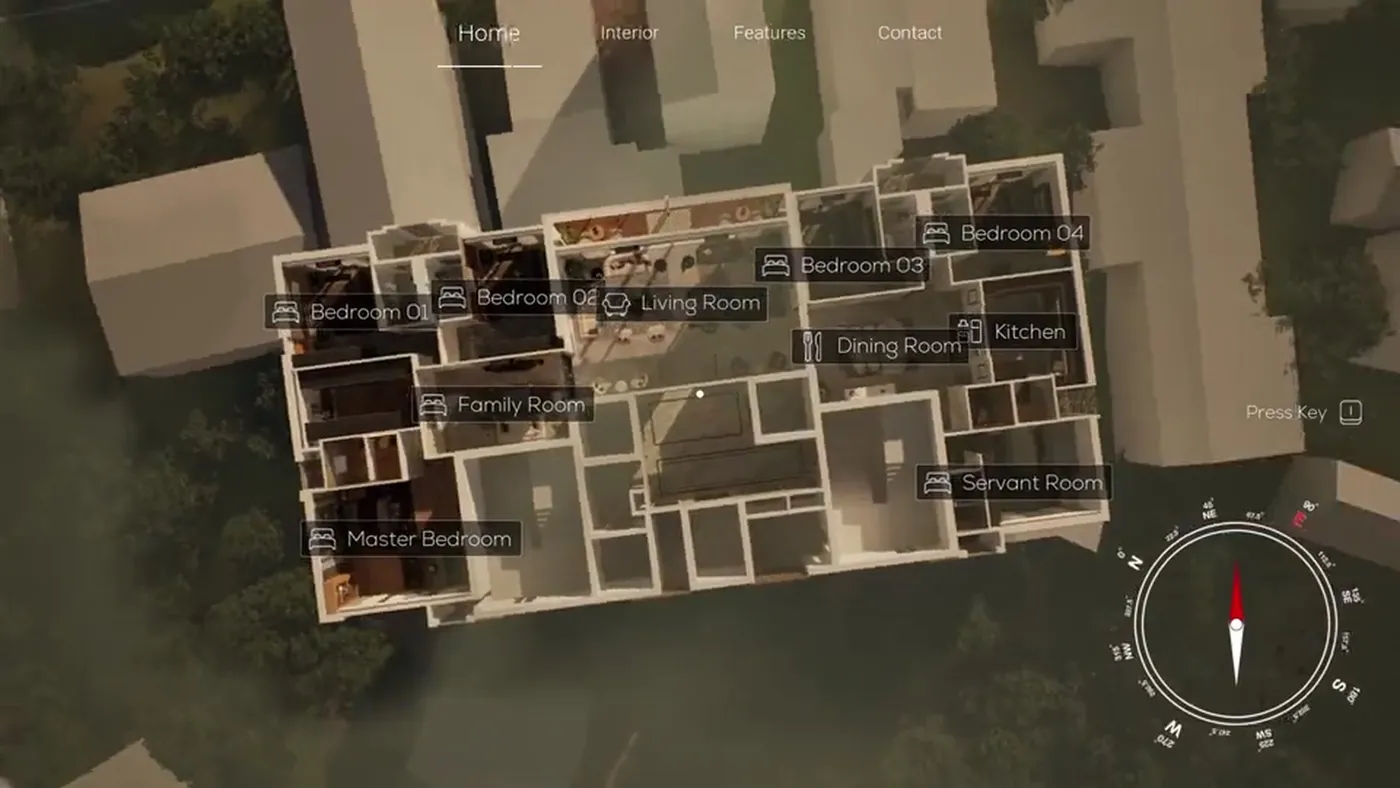
    A dollhouse view of the whole flat from above. The buyer picks a room and enters it.

  • 06

    Only what you sell

    Every option in the configurator is one you have approved, under the name your sales office uses for it.

Work like this

A residence where furniture, finishes and lighting change room by room, and a VR walkthrough of a garden.

Dollhouse overview from the interactive real-time walkthrough Interactive WalkthroughReal-time configurable architectural walkthrough
Garden entry from the outdoor VR walkthrough Garden WalkthroughOutdoor architectural vr & seaside landscape

When a developer should want one

A configurator is worth building when choices are part of the sale: finish packages, an upgraded kitchen, a furnished option. Without one, the sales team explains each combination from samples and brochure pages. A configurator shows the chosen combination directly, and the buyer can try the others without asking.

It is less useful when every flat is sold in one fixed finish. Then there is nothing to configure, and an interactive walkthrough without options, a film or a 360° tour does the job with less work. These are the signs that a configurator fits:

  • Finish packages or upgrades are sold at booking
  • The same flat has more than one layout or furniture option
  • The sales gallery has a touchscreen or a large display
  • There is no show flat yet, or it shows a single specification

What the buyer can change

You decide the list. A common set is the floor, the wall finish, the kitchen cabinets and counter, the bathroom tiles and the furniture style, with a switch between day and evening light. Options can be changed one at a time, or grouped into the packages you sell, so that one choice changes the whole flat.

We advise keeping the list short. Every option has to be modelled, lit and tested with every other option it can be combined with. Three clear packages are easier for a buyer to compare than a long menu.

Configurator, interactive floor plan or walkthrough

These terms are used loosely. An interactive floor plan is usually a plan on a website where the buyer clicks a room to see a picture of it. An interactive walkthrough lets the buyer walk through the flat in 3D. A real estate configurator is a walkthrough in which the main activity is choosing options. Ours includes the floor plan as a dollhouse view, so the buyer can see the whole flat and enter any room from it.

What we need from you

Accurate material references matter more here than on any other kind of project. The buyer is comparing one finish with another, so the difference between them has to be shown truthfully.

  • Floor plans and interior layouts of each flat type
  • The specification sheet for each finish package
  • Samples, product codes or photographs of each material
  • Furniture selections for each style
  • The name you use for each option in sales
  • Where it will run: touchscreen, VR headset or browser

What decides the price

A configurator is quoted per project. The base is the flat itself: its area, the number of rooms and the level of detail. On top of that, the price rises with the number of options and the number of flat types. Options multiply the work, since each one is built and tested in combination with the others.

The number of devices also counts. A touchscreen version is the simplest. VR and browser streaming each add setup and testing, and streaming has a running cost. To keep a first version small, start with one flat type and the options that most affect the sale, and add more later. The interactive walkthrough cost guide explains the units.

How it runs

  1. 01

    Options list

    We agree the flat types and the exact options with you before modelling.

  2. 02

    Build the flat

    The rooms are modelled to your drawings, in the base specification.

  3. 03

    Add the options

    Each finish, kitchen and furniture option is modelled and connected to the menu.

  4. 04

    Test the combinations

    You try every combination on the device it will run on, and mark corrections.

  5. 05

    Handover

    You receive the finished configurator for your touchscreen or headset, or we set it up for streaming.

Questions

How much does a 3D apartment configurator cost?

It is quoted per project. The size of the flat, the number of flat types, the number of options and the devices it runs on decide the price. Send the plans and the options list for a quote.

What is an apartment configurator?

It is an interactive 3D model of a flat in which the buyer changes things such as the flooring, the wall finishes, the kitchen colours and the furniture, and sees the result immediately.

Can buyers change finishes in a walkthrough on a touchscreen?

Yes. On a touchscreen the buyer picks from the options by touch. The same configurator can also run in a VR headset, where the finishes are seen at real size, or be streamed to a browser.

How many options should we include?

As few as the sale needs, because each option adds modelling and testing. Start with the choices buyers make at booking, such as the finish package and the kitchen.

Can options be added after the configurator is finished?

Yes. New finishes or furniture can be added later as extra work. It is quicker if the first version is planned with that in mind, so tell us what may come.

Is it accurate enough for buyers to choose from?

It is as accurate as the references we are given. Send samples, product codes or photographs of each material. For a final decision, a buyer should still see the physical sample.

Do we still need a show flat?

That is your decision. A configurator can show specifications that a show flat does not have, and it can be used before a show flat exists. Our virtual sample flat page compares the options.

Keep going

Get in touch

Send the flat plans and the list of options you sell. We reply with a scope, a quote and a schedule.