
Service Game-Ready 3D Models
Back to top

Game-ready 3D models built to a budget, textured and checked in your engine

Start a project

A model that imports into Unity or Unreal and runs at the frame rate you planned, without a modeller on your side fixing it first. Built to the polygon and texture budget you set.

Service

A game-ready 3D model is built to run in real time: a polygon count that fits your budget, clean UVs, PBR textures, real-world scale, a base pivot and LODs. We build props, furniture, vehicles and products this way, to your brief.

The term promises nothing by itself, so this page lists what ours includes. It is for a studio, a publisher or a real-time team that needs objects made to a specification and delivered in the format its engine imports. If you need to know what the term means before ordering, read what is a game-ready 3D model first. Library models that already meet the same standard turn on the 3D modelling section.

What you get

  • 01

    Built to your polygon budget

    You give us a triangle count per object or per LOD, or we propose one for the platform and the distance it is seen from.

  • 02

    Clean quad topology

    Even loops, no n-gons, no open edges and no inverted faces, so the engine's triangulation and shading behave.

  • 03

    PBR texture set

    Base colour, roughness, metalness, normal and ambient occlusion maps at the resolution agreed, with consistent texel density across a set.

  • 04

    LODs from the same source

    LOD1 and LOD2 reduced from the full model, so silhouettes match when the engine swaps them.

  • 05

    Scale and pivot set

    Real-world dimensions in millimetres, pivot at the base, and the forward axis agreed with you.

  • 06

    Checked in the engine

    Each file is re-imported and inspected, then opened in the engine or viewer you named before it is sent.

Work like this

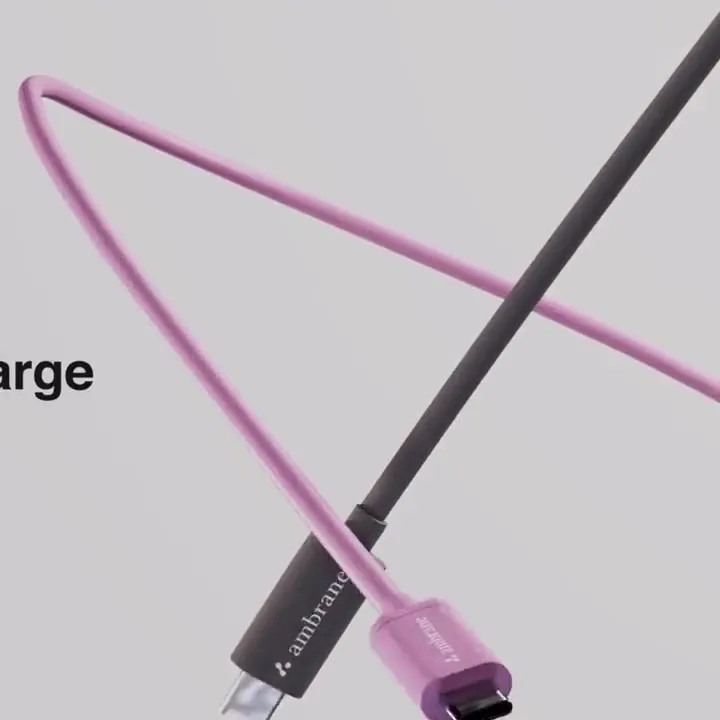
Hard-surface products modelled by the studio for films. The same modelling discipline goes into every game asset.

American Tourister suitcase, frame from the 3D product film American Tourister — Suitcase3d product film — suitcase animation

What game-ready includes here

Our game-ready models pass the list below. Most of it is invisible in a screenshot and all of it shows up in an engine: in frame rate, in shading errors, in a prop that floats above the floor or imports at ten times its size.

  • A triangle count inside the budget you set, per LOD
  • Quad topology with no n-gons, open edges or inverted faces
  • A single clean UV layout with consistent texel density, and a second UV set for lightmaps when the engine needs one
  • PBR textures in the maps and sizes agreed, named consistently
  • LOD1 and LOD2 reduced from the full model
  • Real-world scale in millimetres, pivot at the base, forward axis agreed
  • A collision mesh and engine naming on request
  • Exported in FBX for the engine, with GLB and USDZ if the object also goes to web or AR

Who orders this

Game studios order props and set dressing so that their own artists can stay on characters and hero assets. Publishers and outsourcing managers order sets to a style guide they supply. Real-time teams outside games order them too: a walkthrough built in Unreal Engine needs the same light, clean furniture that a game does, and an AR catalogue needs the Low tier of the same object.

If your need is a volume of similar objects for an environment, the props and environment assets page covers how sets are planned. If it is one complicated machine or vehicle, see hard-surface modelling.

What we need from you

A clear brief saves a round of changes. The list below is the ideal; a reference board and a target platform are enough to start.

  • Concept art, reference photographs or a style guide
  • Drawings, CAD or dimensions of the real object, if it exists
  • The engine and the target platform: PC, console, mobile, VR or browser
  • A triangle budget per object, or the distance it is seen from so we can propose one
  • Texture resolution and the maps your material setup uses
  • How many LODs, and whether you need collision meshes
  • Naming conventions and the forward axis your project uses

How a game-ready model is priced

We quote per model, or per set when the objects share a style and a scale. The three settings that move the price are the detail tier the model is built to, the texture resolution and the number of LODs. A fourth is the starting point: an object with CAD or orthographic drawings is quicker than one reconstructed from photographs. A colour or wear variant of a finished object costs less than a new shape.

The quote lists each object, its budget, maps, LODs and formats, the revision rounds and the schedule. There is no rate card, because a steel tumbler and a hand pump with a pivoting arm are different amounts of work.

When this is the wrong order

If the model is only for stills or a film, a game-ready build is more constraint than you need; order a 3D product model at the detail the camera needs. If you already have a heavy model and want it to run in real time, you need LODs and optimisation rather than a new build. If you only need the files converted to GLB or USDZ, that is a smaller job again.

How it runs

  1. 01

    Brief and budget

    You send references, the engine and platform, and a triangle and texture budget, or we propose one.

  2. 02

    Blockout

    A plain, untextured version at the right scale. You approve proportions and the pivot before detail begins.

  3. 03

    Model and unwrap

    The object is built in clean quads, unwrapped, and reduced into LODs from the same source.

  4. 04

    Texture

    PBR maps are made at the agreed size. You check the materials on a turntable.

  5. 05

    Export and check

    Files are re-imported, inspected, and opened in your engine. Then they are delivered, named as agreed.

Questions

How much does a game-ready 3D model cost?

It is quoted per model or per set. The charge depends on the detail tier, the texture resolution and the number of LODs, and on whether we start from CAD, drawings or photographs. Send typical objects and the engine for a quote.

What makes a 3D model game-ready?

A polygon count the target platform can draw, clean quad topology, a single UV layout with even texel density, PBR textures, real-world scale, a base pivot, LODs and an export the engine reads. Our guide to the term lists the checks.

How many polygons should a game prop have?

It depends on the platform and how close the player gets. A tabletop object in a mobile game and a vehicle on PC have very different budgets. Tell us both and we propose a count per LOD. Our guide to poly count and LODs explains how.

Which file format do you deliver for games?

FBX for Unity and Unreal Engine, with the textures as separate image files. We add GLB and USDZ when the same object also goes to a web page or AR, and .blend and OBJ on request.

Do you follow our naming conventions?

Yes. Send the document or a few example files from your project and we name meshes, materials, textures and LODs the same way.

Can you match an existing art style?

Yes, within hard-surface and prop work. Send a style guide or a few finished assets from the project. We build a first object to match and you approve it before the set continues.

Are the models made with AI?

No. They are built in Blender with our own procedural tooling and checked by hand. Every file is re-imported and inspected before it is sent.

Keep going

Get in touch

Send references, the engine and your polygon budget. You get a quote per object and a schedule by batch.

Clients

Developers, brands and studios we have made work for.

  • Piramal NextGen
  • Raymond
  • Clinique
  • Delta Corp
  • Gillette
  • Piramal Peninsula
  • JM Group
  • The G Story
  • Empire Living
  • Engage
  • Arch Sterix, Nigeria
  • The Croffle Guys
  • Bombay Design Lab
  • AND Design Co
  • QPC Group, Australia