Service LODs & Model Optimisation
Back to top

LODs and 3D model optimisation heavy models made to run in real time

Start a project

A CAD export, a scan or a render model is accurate and far too heavy. We rebuild it light, bake its detail into textures and give it LODs, so it runs where it is needed.

Service

LOD optimisation turns a heavy 3D model into one that runs in real time. We reduce the polygon count, rebuild the surface where it needs it, bake the fine detail into textures and make LOD1 and LOD2, so the model draws quickly near and costs nothing far away.

This page is for a team that already has models and cannot use them: CAD from a manufacturer, a photogrammetry scan, a model built for renders, or an asset bought from a marketplace that stutters on a phone. We do the optimisation by hand and with our own tooling, and we check the result in the engine or viewer you name. The library models on the 3D modelling section were reduced this way from their High tier.

What you get

  • 01

    Polygon reduction

    The count brought down to the budget you set, with the silhouette kept and the reduction concentrated where the eye will not notice.

  • 02

    Retopology

    Where reduction alone leaves a mess, the surface is rebuilt as clean quads that follow the same shape.

  • 03

    Baked detail

    Bolts, seams, engraving and small parts baked from the original into normal and occlusion maps, so the light model keeps its look.

  • 04

    LOD chain

    LOD1 and LOD2 made from the reduced model, named and grouped for your engine, with switching distances suggested.

  • 05

    Textures resized and packed

    Oversized textures brought to the size the platform needs and packed to your material setup.

  • 06

    Checked where it will run

    Opened in your engine, in a browser or on a phone before delivery, with before and after counts in the note.

Work like this

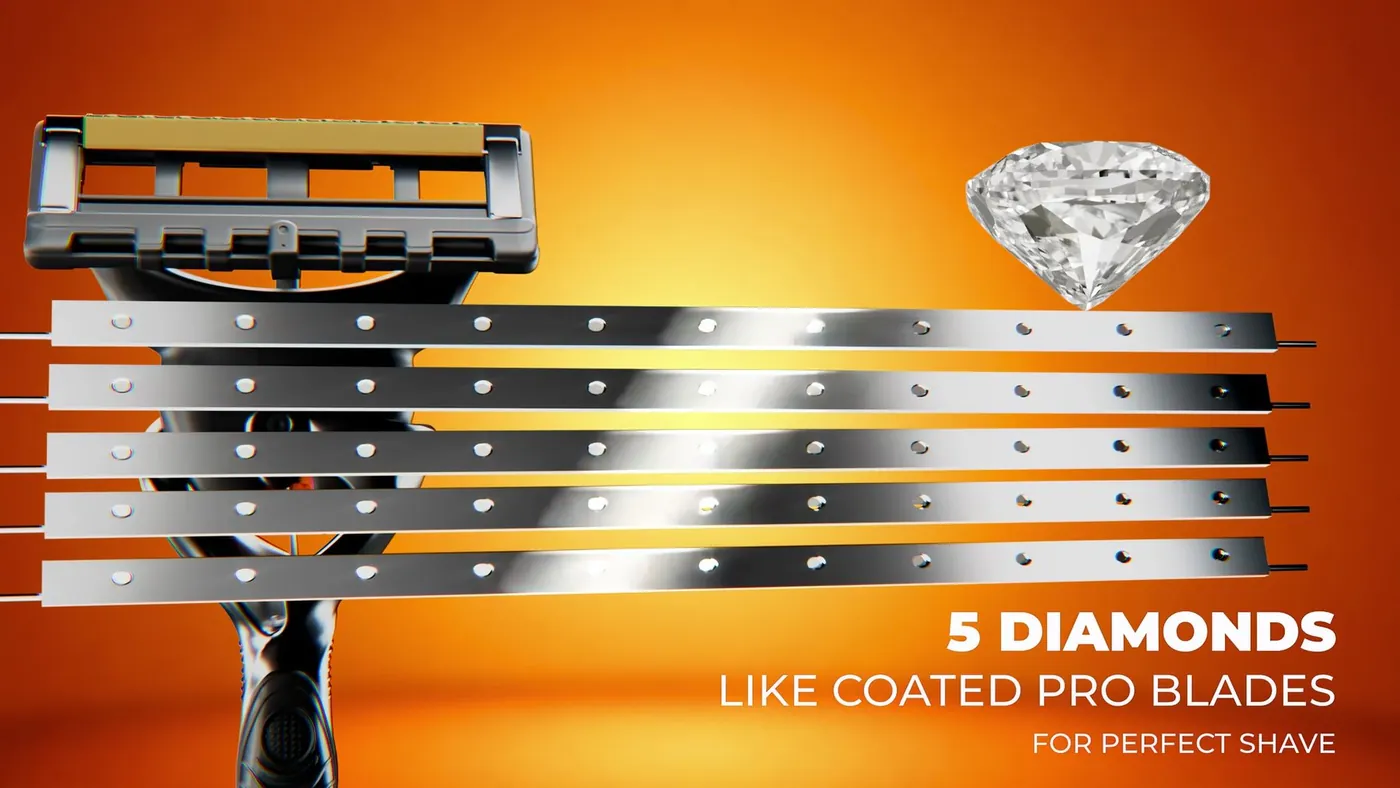
Detailed product models from the studio's film work; the library's Low tiers are the optimised results.

Macro 3D render of the Gillette Fusion 5 razor head Gillette Fusion 5 — Product Film3d product rendering — hero campaign loop
American Tourister suitcase, frame from the 3D product film American Tourister — Suitcase3d product film — suitcase animation

Why heavy models fail in real time

CAD describes a product exactly, down to the thread on a screw, because it exists to manufacture the thing. A scan records every bump of the surface as triangles. A render model is built for one camera and can take minutes per frame. None of these cares how many triangles it has, and a real-time engine cares about little else. Import one into a game or a web viewer and the frame rate drops, the file takes an age to load, and the shading breaks where the mesh is dense and uneven.

Optimisation is the work of keeping what the eye needs and removing what it does not.

What we do to a model

The steps depend on the source. A clean CAD export may need reduction and textures. A scan needs retopology, because its mesh is noise. A render model needs its modelled detail baked away. The usual sequence is below.

  • Inspect the source: triangle count, mesh quality, scale, unit, pivot and existing UVs
  • Remove hidden geometry: internal parts, screws inside housings, the back of a panel no one sees
  • Reduce or retopologise the visible surface to the budget
  • Unwrap, with a lightmap UV set if the engine needs one
  • Bake normal, occlusion and, where useful, colour from the original to the new mesh
  • Build LOD1 and LOD2 from the reduced model
  • Resize and pack textures for the platform
  • Export and import into the target engine or viewer, and compare

What to send

Send the model in whatever format you have: a native CAD file or an OBJ exported from it, a scan with its textures, an FBX or .blend from a render job. Tell us the target: the engine and platform, or the browser and AR use, and the triangle and texture budget if you have one. If the model is a product, add photographs of the real thing, because a scan or CAD often has no usable colour and we rebuild the materials from reference.

How optimisation is priced

Optimisation is quoted per model, or per set for a catalogue. The price depends on the source and the target. A clean CAD export reduced to one Low tier with existing textures is a small job. A noisy scan that needs full retopology, new UVs, baked and rebuilt materials and a full LOD chain is a large one. The number of LODs and the texture resolution move the price in the usual way. If the source turns out to be unusable, we say so after inspection and quote a new build instead.

The quote lists each model, the before and after triangle counts aimed for, the maps, the LODs, the formats and the schedule.

Optimising for the web and AR

The same work makes a product model fit for a web page or an AR viewer, where the limits are file size and mobile data as much as frame rate. Here we also compress the GLB with Draco, bring textures to 1K or smaller and export a USDZ for iPhone. If you have a platform specification with hard limits, see AR-ready 3D models, which builds to that document. If the file format is the only problem, GLB and USDZ conversion is the smaller job.

How it runs

  1. 01

    Inspect

    We open your file, count it, check scale, unit, pivot and UVs, and tell you what it needs.

  2. 02

    Quote

    Per model or per set, with the target counts, maps, LODs and formats listed.

  3. 03

    Reduce or rebuild

    The surface is reduced, or retopologised where reduction leaves it uneven. Hidden parts are removed.

  4. 04

    Bake and texture

    Detail from the original is baked to the new mesh. Materials are rebuilt where the source had none.

  5. 05

    LODs, export, compare

    LODs are built, files exported and imported into your engine or viewer, and compared with the original.

Questions

How much does 3D model optimisation cost?

Per model or per set. A clean CAD export reduced to one tier is a small job; a scan that needs retopology, new UVs, baked materials and an LOD chain is a large one. The number of LODs and the texture sizes move the price. Send a file for an inspection and a quote.

What is LOD optimization?

Making a chain of lighter copies of a model, LOD1 and LOD2, that the engine swaps in as the object moves away from the camera, so distant objects cost little to draw. It usually comes with reducing the base model as well.

Can you reduce the polygon count without changing the look?

From normal viewing distances, yes. The silhouette is kept and the fine detail is baked into a normal map from the original. In an extreme close-up the difference is visible, which is why the High tier is kept for renders.

Can you optimise a CAD file for Unity or Unreal?

Yes. CAD is the most common source we receive. We remove hidden internal parts, reduce or rebuild the surface, add UVs and materials, which CAD lacks, and deliver FBX with LODs for the engine you name.

Can you optimise a 3D scan?

Yes. A scan needs retopology rather than simple reduction, because its mesh is dense noise. We rebuild the surface cleanly and bake the scan's detail and colour onto it.

How many LOD levels do you make?

As many as the object needs, which depends on its size and how far away it is seen. LOD1 and LOD2 suit most props. A small object seen only up close may need none; a large one seen across a level may need more. We suggest a chain and switching distances.

Do you deliver before and after counts?

Yes. The delivery note for each model gives the original triangle count, the count of each LOD, the texture sizes and anything we removed or rebuilt.

Keep going

Get in touch

Send the heavy file and name the engine or viewer it has to run in. We inspect it and reply with a quote per model.

Clients

Developers, brands and studios we have made work for.

  • Piramal NextGen
  • Raymond
  • Clinique
  • Delta Corp
  • Gillette
  • Piramal Peninsula
  • JM Group
  • The G Story
  • Empire Living
  • Engage
  • Arch Sterix, Nigeria
  • The Croffle Guys
  • Bombay Design Lab
  • AND Design Co
  • QPC Group, Australia